> ## Documentation Index
> Fetch the complete documentation index at: https://docs-slidekit.theduomi.com/llms.txt
> Use this file to discover all available pages before exploring further.
# Table Blocks
> Author PowerPoint table slides with rows, dynamic columns, logos, reusable styles, conditional formatting, and pagination.
# Table Blocks
Use a table block when the template slide contains a PowerPoint table and your request needs to fill it with row data. The template supplies the table position, width, and default styling. The payload supplies the rows, columns, and any formatting overrides.
## Basic Shape
Inside `slide_data.content.blocks`, a table block looks like this:
```json theme={"dark"}
{
"type": "table",
"table": {
"table": {
"rows": []
}
}
}
```
The nested `table.table.rows` field is the actual row data.
## Rows and Cells
The table data model is row-first. Each item in `rows` is one PowerPoint table row. Each item in `cells` is one cell in that row.
```json theme={"dark"}
{
"rows": [
{
"cells": [
{ "value": "Column 1" },
{ "value": "Column 2" },
{ "value": "Column 3" }
]
}
]
}
```
In code terms:
```ts theme={"dark"}
rows[0].cells[0] // row 0, column 0
rows[0].cells[1] // row 0, column 1
rows[0].cells[2] // row 0, column 2
```
The generated column count comes from your data. If a header row exists, the number of cells in the header row sets the column count. If there is no header row, the first data row sets it.
```json theme={"dark"}
{
"rows": [
{
"is_header": true,
"cells": [
{ "value": "Company" },
{ "value": "Owner" },
{ "value": "Status" }
]
},
{
"cells": [
{ "value": "stripe.com", "is_logo": true },
{ "value": "Sarah Chen" },
{ "value": "Expansion-ready" }
]
}
]
}
```
In this example:
* The header row has three cells, so the generated table has three columns.
* `is_header: true` marks the first row as the table header.
* Data rows can omit `is_header`; the default is `false`.
* `is_logo: true` tells the renderer to fetch and place the logo for `stripe.com` instead of rendering the domain as text.
## Cell Values
A simple cell uses a string:
```json theme={"dark"}
{ "value": "Expansion-ready" }
```
A logo cell uses a company domain and `is_logo: true`:
```json theme={"dark"}
{ "value": "stripe.com", "is_logo": true }
```
A multi-paragraph cell uses an array. Each object becomes a separate paragraph inside the same table cell:
```json theme={"dark"}
{
"value": [
{ "text": "Marcus Johnson", "format_template": "expert_name" },
{ "text": "SVP of Customer Success", "format_template": "expert_title" }
]
}
```
A bullet list inside one cell uses `is_bullet: true`. If `text` is an array, each string becomes one bullet paragraph:
```json theme={"dark"}
{
"value": [
{
"text": [
"Renewal owner confirmed budget",
"Expansion proposal sent",
"Security review scheduled"
],
"is_bullet": true,
"format_template": "bullet"
}
]
}
```
## Table Formatting
`table_format` applies default styling by table region.
```json theme={"dark"}
{
"table_format": {
"default": {
"text": { "font_name": "Arial", "font_size": 9, "color": "#333333" }
},
"header_row": {
"text": { "bold": true, "color": "#FFFFFF" },
"cell": { "background_color": "#0F766E" }
},
"header_column": {
"text": { "bold": true },
"cell": { "background_color": "#E5E7EB" }
},
"header_intersection": {
"text": { "bold": true, "color": "#FFFFFF" },
"cell": { "background_color": "#111827" }
}
}
}
```
Supported text fields include `font_name`, `font_size`, `bold`, `italic`, `color`, `alignment`, and `line_spacing`.
Supported cell fields include `background_color`, `border_color`, and `border_width`.
## Column Configs
Use `column_configs` for column-level behavior.
```json theme={"dark"}
{
"column_configs": [
{
"column_index": 0,
"is_header": true
},
{
"column_index": 2,
"format_template": "risk_score"
}
]
}
```
`column_index` is zero-based. Column `0` is the first column.
If `is_header` is `true`, that column is treated as a row-header column and can receive `table_format.header_column` styling.
If `format_template` is set, that template applies to every non-header cell in the column.
## Format Templates
`format_templates` defines named styles inside the table payload. Reference a template by name from:
* `column_configs[]` to style every non-header cell in a column
* a cell to style that one cell
* a paragraph object inside a cell to style only that paragraph
```json theme={"dark"}
{
"format_templates": {
"expert_name": {
"text": { "bold": true }
},
"expert_title": {
"text": { "italic": false }
}
},
"rows": [
{
"cells": [
{ "value": "salesforce.com", "is_logo": true },
{
"value": [
{ "text": "Marcus Johnson", "format_template": "expert_name" },
{ "text": "SVP of Customer Success", "format_template": "expert_title" }
]
},
{ "value": "Advisory Board" }
]
}
]
}
```
In this example, `Marcus Johnson` and `SVP of Customer Success` are two paragraphs inside the same `Contact` cell. They are not separate columns.
## Conditional Rules
Conditional `rules` are defined inside `format_templates`. They do nothing until you reference the template from a cell or column.
This example applies conditional formatting to every non-header cell in column `1`.
```json theme={"dark"}
{
"format_templates": {
"date_highlight": {
"rules": [
{
"condition": { "field": "value", "operator": "contains", "value": "2025" },
"text": { "bold": true, "color": "#842029" },
"cell": { "background_color": "#FDECEC" }
},
{
"condition": { "field": "value", "operator": "contains", "value": "2026" },
"text": { "bold": true, "color": "#0F5132" },
"cell": { "background_color": "#E7F4EE" }
}
]
}
},
"column_configs": [
{ "column_index": 1, "format_template": "date_highlight" }
]
}
```
Supported conditional operators are `equals`, `not_equals`, `contains`, `not_contains`, `greater_than`, `less_than`, `greater_than_or_equal`, and `less_than_or_equal`.
## Pagination
Set `auto_paginate_tables: true` to let overflowing rows continue onto additional slides for table-only layouts.
```json theme={"dark"}
{
"options": {
"auto_paginate_tables": true,
"table_min_font_size": 8
}
}
```
When pagination creates continuation slides, the header row repeats so every generated slide keeps the same column labels.
Pagination does not apply to slides that combine a table with text or use a two-column layout. For those slides, set `auto_paginate_tables: false` and let the renderer fit the content on one slide.
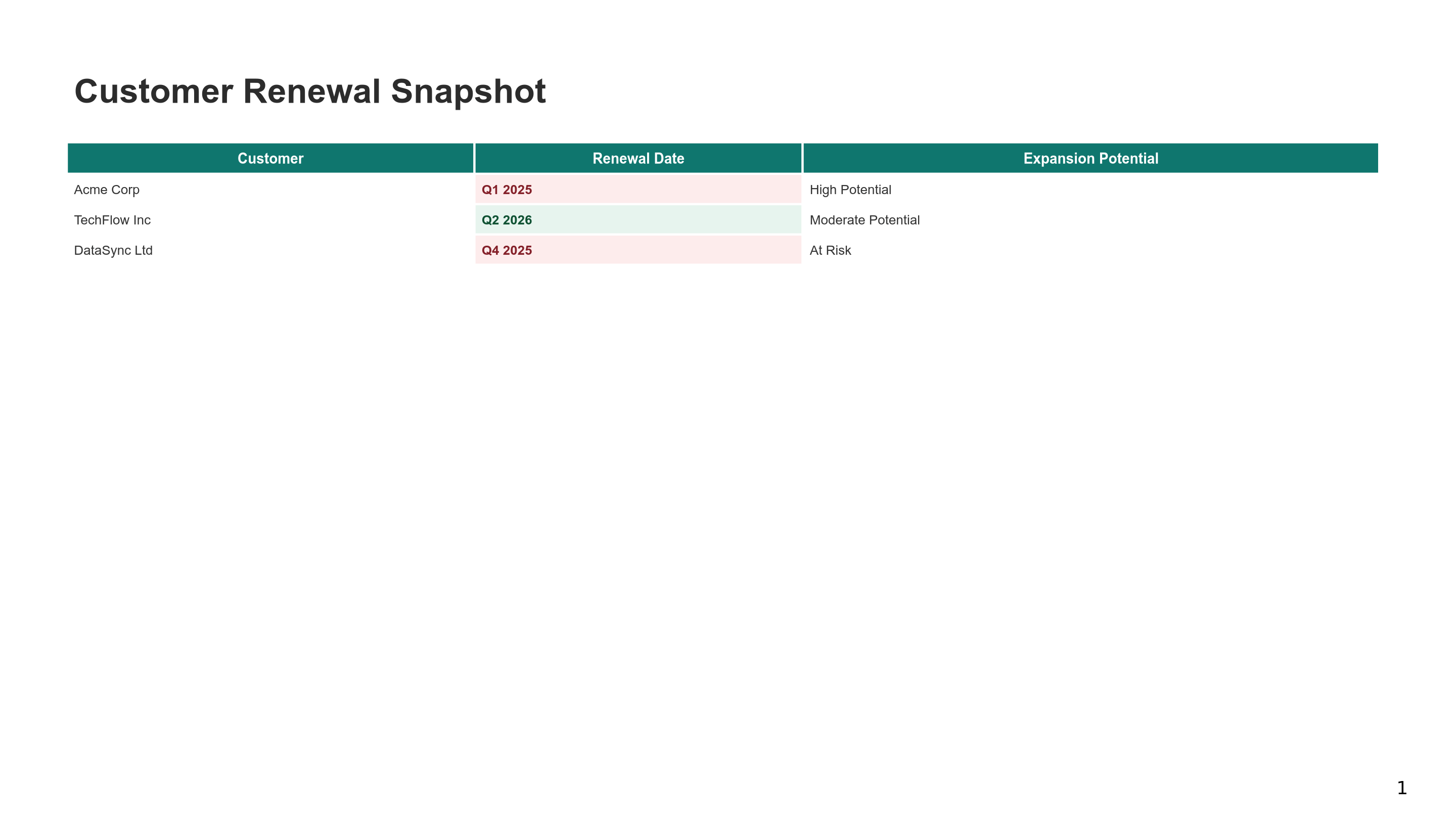
## Visual Example
The visual example below is generated from this exact `slide_data` payload.
```json theme={"dark"}
{
"title": "Customer Renewal Snapshot",
"content": {
"blocks": [
{
"type": "table",
"table": {
"table": {
"table_format": {
"default": {
"text": {
"font_name": "Arial",
"font_size": 9,
"color": "#333333"
}
},
"header_row": {
"text": {
"bold": true,
"color": "#FFFFFF"
},
"cell": {
"background_color": "#0F766E"
}
}
},
"format_templates": {
"date_highlight": {
"rules": [
{
"condition": {
"field": "value",
"operator": "contains",
"value": "2025"
},
"text": {
"bold": true,
"color": "#842029"
},
"cell": {
"background_color": "#FDECEC"
}
},
{
"condition": {
"field": "value",
"operator": "contains",
"value": "2026"
},
"text": {
"bold": true,
"color": "#0F5132"
},
"cell": {
"background_color": "#E7F4EE"
}
}
]
}
},
"column_configs": [
{
"column_index": 1,
"format_template": "date_highlight"
}
],
"rows": [
{
"is_header": true,
"cells": [
{
"value": "Customer"
},
{
"value": "Renewal Date"
},
{
"value": "Expansion Potential"
}
]
},
{
"cells": [
{
"value": "Acme Corp"
},
{
"value": "Q1 2025"
},
{
"value": "High Potential"
}
]
},
{
"cells": [
{
"value": "TechFlow Inc"
},
{
"value": "Q2 2026"
},
{
"value": "Moderate Potential"
}
]
},
{
"cells": [
{
"value": "DataSync Ltd"
},
{
"value": "Q4 2025"
},
{
"value": "At Risk"
}
]
}
]
}
}
}
]
}
}
```
 ## Related Guides
Generate one slide or a full deck.
Author bar and column charts.
Author slide text and text sections.
## Related Guides
Generate one slide or a full deck.
Author bar and column charts.
Author slide text and text sections.