> ## Documentation Index
> Fetch the complete documentation index at: https://docs-slidekit.theduomi.com/llms.txt
> Use this file to discover all available pages before exploring further.
# Examples
> Walk through a full demo deck, from template upload and JSON mapping through generated .pptx output.
Every `template_slide_id` comes from template analysis. If you upload a fresh copy of the template, replace the demo `slide_*` values with the `slideId` values returned for your upload.
## Visual Overview
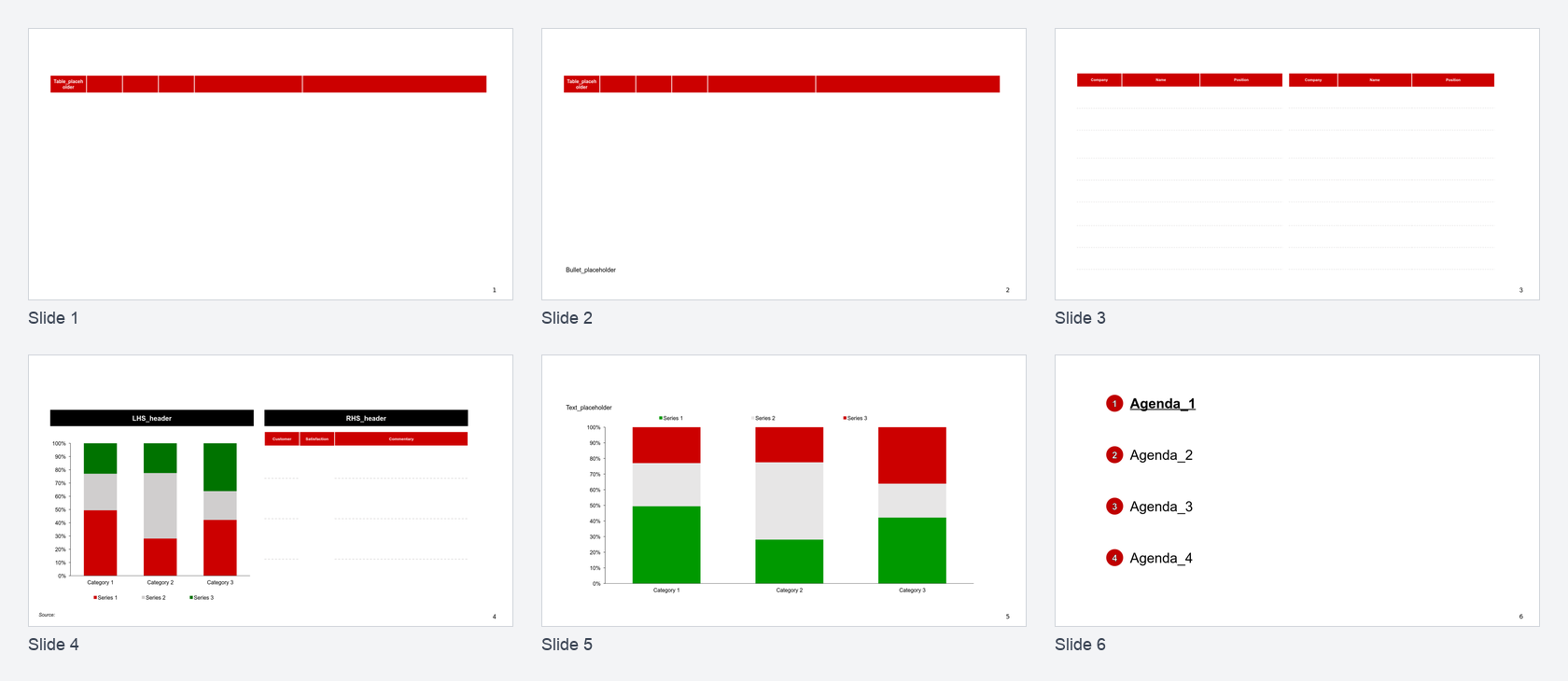
Generation starts with a PowerPoint template and a deck request JSON. The template supplies the reusable slide layouts; the JSON supplies the content and rendering options.
| Input | What it contributes |
| ------------------- | ---------------------------------------------------------------------------------------------------------------------------------------- |
| PowerPoint template | Slide layouts, fonts, placeholder positions, table styling, chart containers, and footer/page-number placement |
| Deck request JSON | Agenda sections, table rows, text commentary, logo cells, chart categories, chart series, conditional formatting, and generation options |
| Generated `.pptx` | A populated deck that keeps the template styling while replacing placeholders with the request content |
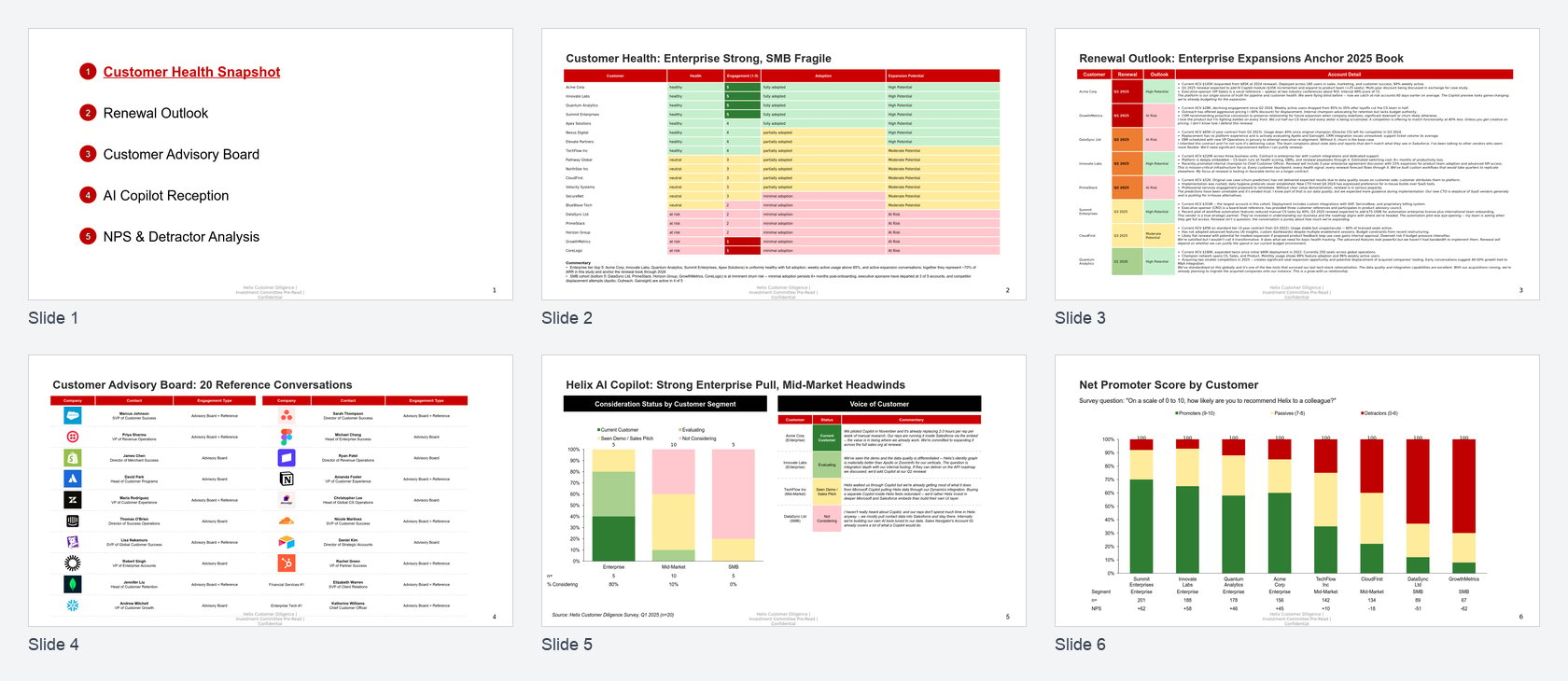 The output deck renders one logical slide per request slide:
| Output slide | Generated title | Template layout | Main input blocks |
| ------------ | -------------------------------------------------------------- | ------------------------ | ---------------------------- |
| 1 | Agenda | Agenda | `agenda` |
| 2 | Customer Health: Enterprise Strong, SMB Fragile | Table + text | `table`, `text` |
| 3 | Renewal Outlook: Enterprise Expansions Anchor 2025 Book | Table-only | `table` |
| 4 | Customer Advisory Board: 20 Reference Conversations | Logo table | `table` with `is_logo` cells |
| 5 | Helix AI Copilot: Strong Enterprise Pull, Mid-Market Headwinds | Two-column chart + table | `chart`, `table` |
| 6 | Net Promoter Score by Customer | Chart + text | `chart`, `text` |
## Full Deck Walkthrough
### 1. Set Request Variables
```bash theme={"dark"}
export API_BASE="https://your-api.example.com"
export API_KEY="your-api-key"
export TEMPLATE_PATH="/path/to/template.pptx"
export DATA_PATH="/path/to/deck-request.json"
export OUTPUT_PATH="generated-deck.pptx"
```
### 2. Upload the Template
Upload your PowerPoint template once. The API returns a `template_id` plus a signed upload URL.
```bash theme={"dark"}
export TEMPLATE_SIZE=$(wc -c < "$TEMPLATE_PATH" | tr -d ' ')
curl -sS -X POST "$API_BASE/api/v1/templates" \
-H "X-API-Key: $API_KEY" \
-H "Content-Type: application/json" \
--data "{
\"filename\": \"customer-diligence-template.pptx\",
\"file_size\": $TEMPLATE_SIZE,
\"metadata\": {
\"category\": \"demo\",
\"tags\": [\"voice-of-customer\"],
\"description\": \"Demo template with agenda, tables, logos, and charts\"
}
}" \
-o template-upload.json
```
```bash theme={"dark"}
export TEMPLATE_ID=$(jq -r '.template_id' template-upload.json)
export UPLOAD_URL=$(jq -r '.upload_url' template-upload.json)
curl -sS -X PUT "$UPLOAD_URL" \
-H "Content-Type: application/vnd.openxmlformats-officedocument.presentationml.presentation" \
--upload-file "$TEMPLATE_PATH"
curl -sS -X POST "$API_BASE/api/v1/templates/$TEMPLATE_ID/upload/confirm" \
-H "X-API-Key: $API_KEY"
```
### 3. Analyze the Template
Analysis reads the PowerPoint file and assigns a `slideId` to each template slide. Those IDs are what the generation request uses as `template_slide_id`.
```bash theme={"dark"}
curl -sS -X POST "$API_BASE/api/v1/templates/$TEMPLATE_ID/analysis" \
-H "X-API-Key: $API_KEY" \
-H "Content-Type: application/json" \
--data '{
"options": {
"parse_master_template_layout": true,
"parse_slides": true,
"include_placeholder_positions": true,
"include_table_details": true
}
}'
```
Poll the analysis endpoint until it returns a completed result:
```bash theme={"dark"}
curl -sS "$API_BASE/api/v1/templates/$TEMPLATE_ID/analysis" \
-H "X-API-Key: $API_KEY" \
-o template-analysis.json
```
Print the analyzed slide IDs:
```bash theme={"dark"}
jq -r '(.results.slides // .slides)[] | "\(.slideNumber)\t\(.slideId)"' template-analysis.json
```
Example output:
```
1 slide_11d45035
2 slide_52292b72
3 slide_93106c67
4 slide_f53f7a49
5 slide_353000d7
6 slide_cfb80823
```
Each `slideId` is a stable identifier you pass as `template_slide_id` in generation requests. The actual values are short hex strings — for readability, the rest of this guide uses semantic names (`slide_agenda`, `slide_table_only`, etc.) in place of those IDs.
The generated output uses this layout mapping:
| Placeholder used in this guide | Real ID example | Template slot | Used by demo slide |
| ------------------------------ | ---------------- | ------------------------ | ----------------------- |
| `slide_agenda` | `slide_cfb80823` | Agenda | Agenda |
| `slide_table_text` | `slide_52292b72` | Table + text | Customer health |
| `slide_table_only` | `slide_11d45035` | Table-only | Renewal outlook |
| `slide_logo_table` | `slide_93106c67` | Logo table | Customer advisory board |
| `slide_chart_table` | `slide_f53f7a49` | Two-column chart + table | Helix AI Copilot |
| `slide_chart_text` | `slide_353000d7` | Chart + text | Net Promoter Score |
When you upload the template yourself, swap the semantic placeholders in the request below for whatever `slideId` values your analysis returns.
### 4. Review the Deck Request
The deck request JSON is shaped for `generate-deck`. The outer object has `slides` and deck-level `options`.
```json theme={"dark"}
{
"slides": [
{
"template_slide_id": "slide_agenda",
"slide_data": {
"title": "Agenda",
"content": { "blocks": [{ "type": "agenda" }] }
}
},
{
"template_slide_id": "slide_table_text",
"slide_data": {
"title": "Customer Health: Enterprise Strong, SMB Fragile",
"content": { "blocks": [{ "type": "table" }, { "type": "text" }] }
},
"options": {
"auto_paginate_tables": false,
"allow_textbox_reposition": true,
"table_min_font_size": 8,
"textbox_min_font_size": 11
}
},
{
"template_slide_id": "slide_table_only",
"slide_data": {
"title": "Renewal Outlook: Enterprise Expansions Anchor 2025 Book",
"content": { "blocks": [{ "type": "table" }] }
},
"options": {
"auto_paginate_tables": true,
"table_min_font_size": 9
}
},
{
"template_slide_id": "slide_logo_table",
"slide_data": {
"title": "Customer Advisory Board: 20 Reference Conversations",
"content": { "blocks": [{ "type": "table" }] }
},
"options": {
"auto_paginate_tables": true,
"table_min_font_size": 11
}
},
{
"template_slide_id": "slide_chart_table",
"slide_data": {
"title": "Helix AI Copilot: Strong Enterprise Pull, Mid-Market Headwinds",
"content": [
{ "header": "Consideration Status by Customer Segment", "blocks": [{ "type": "chart" }] },
{ "header": "Voice of Customer", "blocks": [{ "type": "table" }] }
]
},
"options": { "auto_paginate_tables": false }
},
{
"template_slide_id": "slide_chart_text",
"slide_data": {
"title": "Net Promoter Score by Customer",
"content": { "blocks": [{ "type": "chart" }, { "type": "text" }] }
},
"options": { "auto_paginate_tables": false }
}
],
"options": {
"auto_paginate_tables": true,
"table_min_font_size": 9,
"textbox_min_font_size": 11,
"show_slide_numbers": true,
"footer_text": "Helix Customer Diligence | Investment Committee Pre-Read | Confidential"
}
}
```
The full file contains the actual rows, quotes, conditional formatting, and chart values. Key patterns:
| Slide | What the JSON controls |
| ---------------- | ------------------------------------------------------------------------------------------------------------------------------------------------------------------------------------------------------------ |
| Agenda | `agenda.sections` supplies the five agenda labels. `active_index: 0` marks the first section active, and `active_font_color` controls the active label color. |
| Customer health | A 20-row table is populated, then status columns use `column_configs` and `format_templates` to color health, engagement, adoption, and expansion cells. A `text` block fills the commentary box. |
| Renewal outlook | A table-only layout receives eight account rows with mixed cell content: bullet paragraphs plus italic quote paragraphs. `auto_paginate_tables: true` allows continuation pages if the table overflows. |
| Advisory board | A 21-row contact table uses `is_logo: true` cells to fetch and render company logos where domains are provided. Name/title styling comes from reusable `format_templates`. |
| Helix AI Copilot | Two-column `content` sends a percent stacked column chart to one side and a Voice of Customer table to the other. Chart `series[].color`, `show_bar_labels`, and `data_rows` drive the visual chart details. |
| NPS | A full-width percent stacked column chart receives eight customer categories, three NPS series, chart labels, and data rows. A trailing `text` block renders the survey note. |
### 5. Generate the Deck
Submit the JSON file to the async deck-generation endpoint:
```bash theme={"dark"}
curl -sS -X POST "$API_BASE/api/v1/presentations/generate-deck" \
-H "X-API-Key: $API_KEY" \
-H "Content-Type: application/json" \
--data @"$DATA_PATH" \
-o generation-start.json
```
The response returns a `generation_id` and `status_url`.
```json theme={"dark"}
{
"generation_id": "gen_abc123",
"status": "pending",
"message": "Generation started. Poll status URL for progress.",
"status_url": "https://your-api.example.com/api/v1/presentations/gen_abc123/status"
}
```
### 6. Poll for Completion
```bash theme={"dark"}
export GENERATION_ID=$(jq -r '.generation_id' generation-start.json)
curl -sS "$API_BASE/api/v1/presentations/$GENERATION_ID/status" \
-H "X-API-Key: $API_KEY" \
-o generation-status.json
```
Repeat the status request until `status` is `completed` or `partial`. The completed result includes `total_pages_generated`, per-slide results, and a `download_url`.
```json theme={"dark"}
{
"generation_id": "gen_abc123",
"status": "completed",
"total_slides_requested": 6,
"total_pages_generated": 6,
"slide_results": [
{ "slide_index": 0, "template_slide_id": "slide_agenda", "pages_generated": 1, "status": "completed", "error": null },
{ "slide_index": 1, "template_slide_id": "slide_table_text", "pages_generated": 1, "status": "completed", "error": null },
{ "slide_index": 2, "template_slide_id": "slide_table_only", "pages_generated": 1, "status": "completed", "error": null },
{ "slide_index": 3, "template_slide_id": "slide_logo_table", "pages_generated": 1, "status": "completed", "error": null },
{ "slide_index": 4, "template_slide_id": "slide_chart_table", "pages_generated": 1, "status": "completed", "error": null },
{ "slide_index": 5, "template_slide_id": "slide_chart_text", "pages_generated": 1, "status": "completed", "error": null }
],
"download_url": "https://storage.example.com/download/gen_abc123.pptx?token=..."
}
```
### 7. Download the Output
```bash theme={"dark"}
curl -L "$API_BASE/api/v1/presentations/$GENERATION_ID/download" \
-H "X-API-Key: $API_KEY" \
-o "$OUTPUT_PATH"
```
The downloaded file should match the expected deck shape: six populated slides, template styling inherited from the uploaded template, slide numbers enabled, and the deck-level footer applied across the output.
### Equivalent Helper Flow
An SDK helper or demo script should perform the same operations:
1. Upload the template.
2. Analyze the uploaded template and read the six `slideId` values.
3. Load the deck request JSON.
4. Ensure each slide points at the template slide with the matching layout.
5. Call `generate-deck`, poll status, and download the finished `.pptx`.
Use the raw API steps above when you want to integrate generation into your own app. Use a helper script when you want a repeatable local smoke test.
## Payload Snippets
Use these smaller examples when you only need one slide pattern.
```json theme={"dark"}
{
"template_slide_id": "slide_text",
"slide_data": {
"title": "Strategic Priorities",
"content": {
"blocks": [
{
"type": "text",
"text": {
"header": "Focus areas",
"bullets": [
"Expand enterprise pipeline",
"Improve renewal readiness",
"Launch executive sponsor program"
]
}
}
]
}
}
}
```
```json theme={"dark"}
{
"template_slide_id": "slide_logo_table",
"slide_data": {
"title": "Customer Reference Map",
"content": {
"blocks": [
{
"type": "table",
"table": {
"table": {
"rows": [
{
"is_header": true,
"cells": [
{ "value": "Company" },
{ "value": "Contact" },
{ "value": "Status" }
]
},
{
"cells": [
{ "value": "stripe.com", "is_logo": true },
{ "value": [{ "text": "Sarah Chen" }, { "text": "VP Revenue Operations" }] },
{ "value": "Reference-ready" }
]
}
]
}
}
}
]
}
}
}
```
```json theme={"dark"}
{
"template_slide_id": "slide_chart",
"slide_data": {
"title": "Pipeline Mix",
"content": {
"blocks": [
{
"type": "chart",
"chart": {
"chart_type": "clustered_column",
"categories": ["Enterprise", "Mid-Market", "SMB"],
"series": [
{ "name": "Committed", "values": [12.4, 8.2, 4.1], "color": "#0F766E" },
{ "name": "Upside", "values": [5.1, 4.4, 2.8], "color": "#2563EB" }
],
"show_bar_labels": true,
"value_axis_unit": "$M",
"data_rows": [
["Total", "$17.5M", "$12.6M", "$6.9M"],
["Coverage", "3.1x", "2.6x", "2.2x"]
],
"data_table_format": {
"font_name": "Arial",
"font_size": 8
}
}
}
]
}
}
}
```
The output deck renders one logical slide per request slide:
| Output slide | Generated title | Template layout | Main input blocks |
| ------------ | -------------------------------------------------------------- | ------------------------ | ---------------------------- |
| 1 | Agenda | Agenda | `agenda` |
| 2 | Customer Health: Enterprise Strong, SMB Fragile | Table + text | `table`, `text` |
| 3 | Renewal Outlook: Enterprise Expansions Anchor 2025 Book | Table-only | `table` |
| 4 | Customer Advisory Board: 20 Reference Conversations | Logo table | `table` with `is_logo` cells |
| 5 | Helix AI Copilot: Strong Enterprise Pull, Mid-Market Headwinds | Two-column chart + table | `chart`, `table` |
| 6 | Net Promoter Score by Customer | Chart + text | `chart`, `text` |
## Full Deck Walkthrough
### 1. Set Request Variables
```bash theme={"dark"}
export API_BASE="https://your-api.example.com"
export API_KEY="your-api-key"
export TEMPLATE_PATH="/path/to/template.pptx"
export DATA_PATH="/path/to/deck-request.json"
export OUTPUT_PATH="generated-deck.pptx"
```
### 2. Upload the Template
Upload your PowerPoint template once. The API returns a `template_id` plus a signed upload URL.
```bash theme={"dark"}
export TEMPLATE_SIZE=$(wc -c < "$TEMPLATE_PATH" | tr -d ' ')
curl -sS -X POST "$API_BASE/api/v1/templates" \
-H "X-API-Key: $API_KEY" \
-H "Content-Type: application/json" \
--data "{
\"filename\": \"customer-diligence-template.pptx\",
\"file_size\": $TEMPLATE_SIZE,
\"metadata\": {
\"category\": \"demo\",
\"tags\": [\"voice-of-customer\"],
\"description\": \"Demo template with agenda, tables, logos, and charts\"
}
}" \
-o template-upload.json
```
```bash theme={"dark"}
export TEMPLATE_ID=$(jq -r '.template_id' template-upload.json)
export UPLOAD_URL=$(jq -r '.upload_url' template-upload.json)
curl -sS -X PUT "$UPLOAD_URL" \
-H "Content-Type: application/vnd.openxmlformats-officedocument.presentationml.presentation" \
--upload-file "$TEMPLATE_PATH"
curl -sS -X POST "$API_BASE/api/v1/templates/$TEMPLATE_ID/upload/confirm" \
-H "X-API-Key: $API_KEY"
```
### 3. Analyze the Template
Analysis reads the PowerPoint file and assigns a `slideId` to each template slide. Those IDs are what the generation request uses as `template_slide_id`.
```bash theme={"dark"}
curl -sS -X POST "$API_BASE/api/v1/templates/$TEMPLATE_ID/analysis" \
-H "X-API-Key: $API_KEY" \
-H "Content-Type: application/json" \
--data '{
"options": {
"parse_master_template_layout": true,
"parse_slides": true,
"include_placeholder_positions": true,
"include_table_details": true
}
}'
```
Poll the analysis endpoint until it returns a completed result:
```bash theme={"dark"}
curl -sS "$API_BASE/api/v1/templates/$TEMPLATE_ID/analysis" \
-H "X-API-Key: $API_KEY" \
-o template-analysis.json
```
Print the analyzed slide IDs:
```bash theme={"dark"}
jq -r '(.results.slides // .slides)[] | "\(.slideNumber)\t\(.slideId)"' template-analysis.json
```
Example output:
```
1 slide_11d45035
2 slide_52292b72
3 slide_93106c67
4 slide_f53f7a49
5 slide_353000d7
6 slide_cfb80823
```
Each `slideId` is a stable identifier you pass as `template_slide_id` in generation requests. The actual values are short hex strings — for readability, the rest of this guide uses semantic names (`slide_agenda`, `slide_table_only`, etc.) in place of those IDs.
The generated output uses this layout mapping:
| Placeholder used in this guide | Real ID example | Template slot | Used by demo slide |
| ------------------------------ | ---------------- | ------------------------ | ----------------------- |
| `slide_agenda` | `slide_cfb80823` | Agenda | Agenda |
| `slide_table_text` | `slide_52292b72` | Table + text | Customer health |
| `slide_table_only` | `slide_11d45035` | Table-only | Renewal outlook |
| `slide_logo_table` | `slide_93106c67` | Logo table | Customer advisory board |
| `slide_chart_table` | `slide_f53f7a49` | Two-column chart + table | Helix AI Copilot |
| `slide_chart_text` | `slide_353000d7` | Chart + text | Net Promoter Score |
When you upload the template yourself, swap the semantic placeholders in the request below for whatever `slideId` values your analysis returns.
### 4. Review the Deck Request
The deck request JSON is shaped for `generate-deck`. The outer object has `slides` and deck-level `options`.
```json theme={"dark"}
{
"slides": [
{
"template_slide_id": "slide_agenda",
"slide_data": {
"title": "Agenda",
"content": { "blocks": [{ "type": "agenda" }] }
}
},
{
"template_slide_id": "slide_table_text",
"slide_data": {
"title": "Customer Health: Enterprise Strong, SMB Fragile",
"content": { "blocks": [{ "type": "table" }, { "type": "text" }] }
},
"options": {
"auto_paginate_tables": false,
"allow_textbox_reposition": true,
"table_min_font_size": 8,
"textbox_min_font_size": 11
}
},
{
"template_slide_id": "slide_table_only",
"slide_data": {
"title": "Renewal Outlook: Enterprise Expansions Anchor 2025 Book",
"content": { "blocks": [{ "type": "table" }] }
},
"options": {
"auto_paginate_tables": true,
"table_min_font_size": 9
}
},
{
"template_slide_id": "slide_logo_table",
"slide_data": {
"title": "Customer Advisory Board: 20 Reference Conversations",
"content": { "blocks": [{ "type": "table" }] }
},
"options": {
"auto_paginate_tables": true,
"table_min_font_size": 11
}
},
{
"template_slide_id": "slide_chart_table",
"slide_data": {
"title": "Helix AI Copilot: Strong Enterprise Pull, Mid-Market Headwinds",
"content": [
{ "header": "Consideration Status by Customer Segment", "blocks": [{ "type": "chart" }] },
{ "header": "Voice of Customer", "blocks": [{ "type": "table" }] }
]
},
"options": { "auto_paginate_tables": false }
},
{
"template_slide_id": "slide_chart_text",
"slide_data": {
"title": "Net Promoter Score by Customer",
"content": { "blocks": [{ "type": "chart" }, { "type": "text" }] }
},
"options": { "auto_paginate_tables": false }
}
],
"options": {
"auto_paginate_tables": true,
"table_min_font_size": 9,
"textbox_min_font_size": 11,
"show_slide_numbers": true,
"footer_text": "Helix Customer Diligence | Investment Committee Pre-Read | Confidential"
}
}
```
The full file contains the actual rows, quotes, conditional formatting, and chart values. Key patterns:
| Slide | What the JSON controls |
| ---------------- | ------------------------------------------------------------------------------------------------------------------------------------------------------------------------------------------------------------ |
| Agenda | `agenda.sections` supplies the five agenda labels. `active_index: 0` marks the first section active, and `active_font_color` controls the active label color. |
| Customer health | A 20-row table is populated, then status columns use `column_configs` and `format_templates` to color health, engagement, adoption, and expansion cells. A `text` block fills the commentary box. |
| Renewal outlook | A table-only layout receives eight account rows with mixed cell content: bullet paragraphs plus italic quote paragraphs. `auto_paginate_tables: true` allows continuation pages if the table overflows. |
| Advisory board | A 21-row contact table uses `is_logo: true` cells to fetch and render company logos where domains are provided. Name/title styling comes from reusable `format_templates`. |
| Helix AI Copilot | Two-column `content` sends a percent stacked column chart to one side and a Voice of Customer table to the other. Chart `series[].color`, `show_bar_labels`, and `data_rows` drive the visual chart details. |
| NPS | A full-width percent stacked column chart receives eight customer categories, three NPS series, chart labels, and data rows. A trailing `text` block renders the survey note. |
### 5. Generate the Deck
Submit the JSON file to the async deck-generation endpoint:
```bash theme={"dark"}
curl -sS -X POST "$API_BASE/api/v1/presentations/generate-deck" \
-H "X-API-Key: $API_KEY" \
-H "Content-Type: application/json" \
--data @"$DATA_PATH" \
-o generation-start.json
```
The response returns a `generation_id` and `status_url`.
```json theme={"dark"}
{
"generation_id": "gen_abc123",
"status": "pending",
"message": "Generation started. Poll status URL for progress.",
"status_url": "https://your-api.example.com/api/v1/presentations/gen_abc123/status"
}
```
### 6. Poll for Completion
```bash theme={"dark"}
export GENERATION_ID=$(jq -r '.generation_id' generation-start.json)
curl -sS "$API_BASE/api/v1/presentations/$GENERATION_ID/status" \
-H "X-API-Key: $API_KEY" \
-o generation-status.json
```
Repeat the status request until `status` is `completed` or `partial`. The completed result includes `total_pages_generated`, per-slide results, and a `download_url`.
```json theme={"dark"}
{
"generation_id": "gen_abc123",
"status": "completed",
"total_slides_requested": 6,
"total_pages_generated": 6,
"slide_results": [
{ "slide_index": 0, "template_slide_id": "slide_agenda", "pages_generated": 1, "status": "completed", "error": null },
{ "slide_index": 1, "template_slide_id": "slide_table_text", "pages_generated": 1, "status": "completed", "error": null },
{ "slide_index": 2, "template_slide_id": "slide_table_only", "pages_generated": 1, "status": "completed", "error": null },
{ "slide_index": 3, "template_slide_id": "slide_logo_table", "pages_generated": 1, "status": "completed", "error": null },
{ "slide_index": 4, "template_slide_id": "slide_chart_table", "pages_generated": 1, "status": "completed", "error": null },
{ "slide_index": 5, "template_slide_id": "slide_chart_text", "pages_generated": 1, "status": "completed", "error": null }
],
"download_url": "https://storage.example.com/download/gen_abc123.pptx?token=..."
}
```
### 7. Download the Output
```bash theme={"dark"}
curl -L "$API_BASE/api/v1/presentations/$GENERATION_ID/download" \
-H "X-API-Key: $API_KEY" \
-o "$OUTPUT_PATH"
```
The downloaded file should match the expected deck shape: six populated slides, template styling inherited from the uploaded template, slide numbers enabled, and the deck-level footer applied across the output.
### Equivalent Helper Flow
An SDK helper or demo script should perform the same operations:
1. Upload the template.
2. Analyze the uploaded template and read the six `slideId` values.
3. Load the deck request JSON.
4. Ensure each slide points at the template slide with the matching layout.
5. Call `generate-deck`, poll status, and download the finished `.pptx`.
Use the raw API steps above when you want to integrate generation into your own app. Use a helper script when you want a repeatable local smoke test.
## Payload Snippets
Use these smaller examples when you only need one slide pattern.
```json theme={"dark"}
{
"template_slide_id": "slide_text",
"slide_data": {
"title": "Strategic Priorities",
"content": {
"blocks": [
{
"type": "text",
"text": {
"header": "Focus areas",
"bullets": [
"Expand enterprise pipeline",
"Improve renewal readiness",
"Launch executive sponsor program"
]
}
}
]
}
}
}
```
```json theme={"dark"}
{
"template_slide_id": "slide_logo_table",
"slide_data": {
"title": "Customer Reference Map",
"content": {
"blocks": [
{
"type": "table",
"table": {
"table": {
"rows": [
{
"is_header": true,
"cells": [
{ "value": "Company" },
{ "value": "Contact" },
{ "value": "Status" }
]
},
{
"cells": [
{ "value": "stripe.com", "is_logo": true },
{ "value": [{ "text": "Sarah Chen" }, { "text": "VP Revenue Operations" }] },
{ "value": "Reference-ready" }
]
}
]
}
}
}
]
}
}
}
```
```json theme={"dark"}
{
"template_slide_id": "slide_chart",
"slide_data": {
"title": "Pipeline Mix",
"content": {
"blocks": [
{
"type": "chart",
"chart": {
"chart_type": "clustered_column",
"categories": ["Enterprise", "Mid-Market", "SMB"],
"series": [
{ "name": "Committed", "values": [12.4, 8.2, 4.1], "color": "#0F766E" },
{ "name": "Upside", "values": [5.1, 4.4, 2.8], "color": "#2563EB" }
],
"show_bar_labels": true,
"value_axis_unit": "$M",
"data_rows": [
["Total", "$17.5M", "$12.6M", "$6.9M"],
["Coverage", "3.1x", "2.6x", "2.2x"]
],
"data_table_format": {
"font_name": "Arial",
"font_size": 8
}
}
}
]
}
}
}
```